



Three small fixes that make your macOS app look native
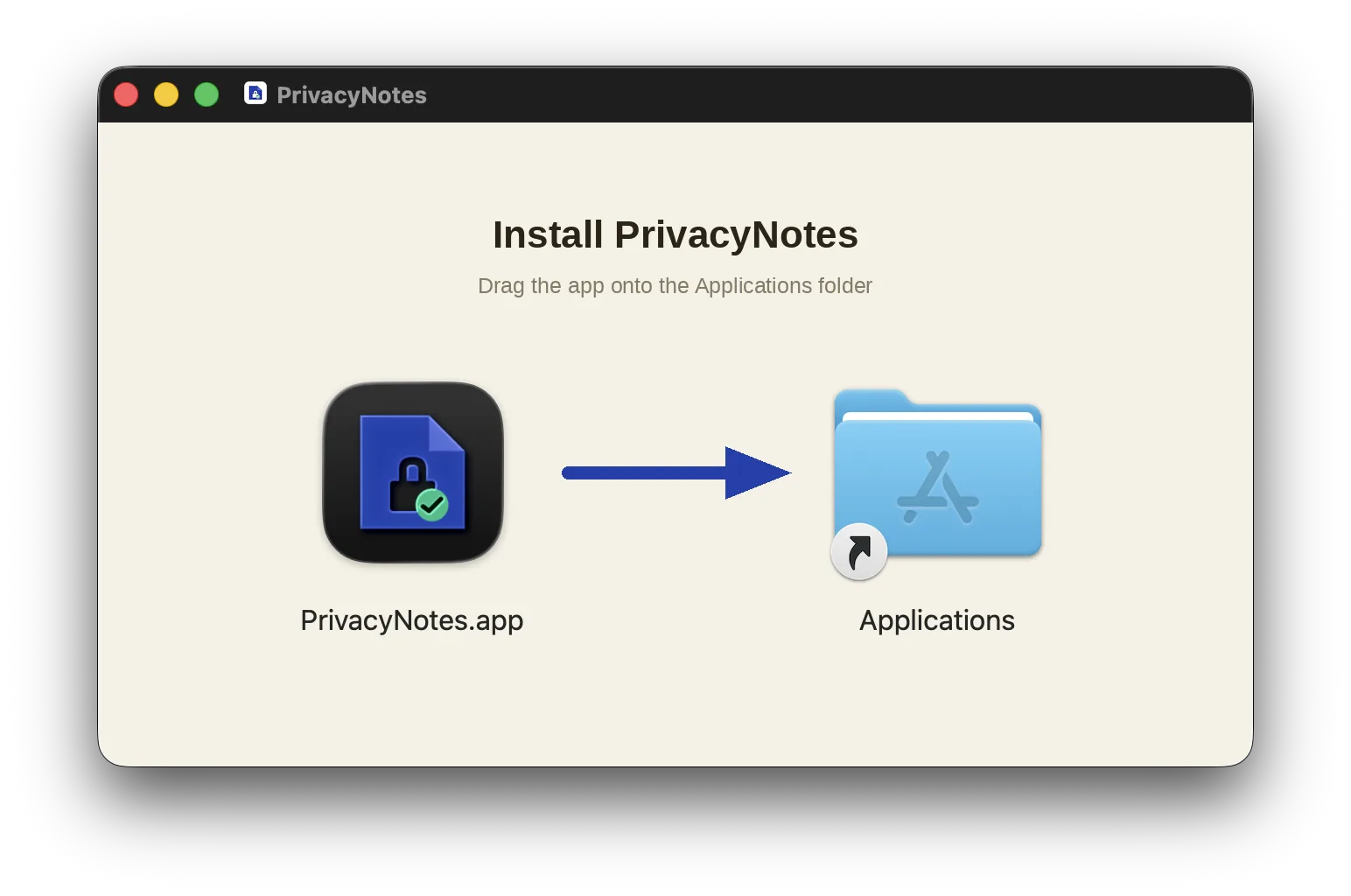
You spend months on features and five minutes on the wrapper. But the DMG, the app icon, and the About window are the first three things a Mac user sees, and each takes under an hour to get right. This post covers all three, including the traps that cost us real debugging time.
We ship PrivacyNotes, an end-to-end encrypted notes app, as a Tauri app. The snippets below are Tauri-flavored, but almost every trap here is a macOS trap, not a framework trap - the DMG and icon sections apply to any stack.
1. The DMG: background image, hidden clutter, no scrollbar
A bare DMG window is a gray void with two icons in it. What you want: a title, a “drag the app onto Applications” hint, and an arrow, with Finder drawing the real app icon and the Applications shortcut on top.
In Tauri this is a few lines of config (tauri.conf.json; the underlying bundler is a fork of create-dmg, which has the same knobs):
"macOS": {
  "dmg": {
    "background": "./dmg/background.png",
    "windowSize": { "width": 660, "height": 400 },
    "appPosition": { "x": 180, "y": 200 },
    "applicationFolderPosition": { "x": 480, "y": 200 }
  }
}
Important mental model: Finder draws the actual icons ON TOP of your background at those two positions. The background image holds only the title, subtitle, and arrow. Never paint fake icons into it.
Three traps, in the order they will bite you:
Trap 1: no background means a stray volume icon inside the window. The bundle script only moves the DMG’s hidden files (.VolumeIcon.icns, .background) offscreen when a background image is set. Skip the background and the volume icon renders in a corner slot of your installer window like an uninvited guest. Always set a background, even a plain one.
Trap 2: label text is always near-black. Finder draws the icon labels (“YourApp.app”, “Applications”) in dark text and there is no supported way to recolor them. A dark background makes the labels unreadable. Go light - we use a cream #F6F1E6.
Trap 3: the phantom scrollbar. The background must render at or just under the window size in points, where points = pixels / (DPI / 72). A Retina 1320x800 image should be exactly 660x400pt at 144 DPI, but PIL cannot write exactly 144 (it rounds to 143.99 DPI), which renders 660.03pt in a 660pt window. That fractional overflow makes Finder show a scrollbar. Fix: save at dpi=(144.07, 144.07), which renders 659.7x399.8pt, a hair inside the window. General rule for any tool: make the image render slightly smaller than the window, never slightly larger.
Our full background generator, for reference:
from PIL import Image, ImageDraw, ImageFont
W, H = 1320, 800                       # 2x of the 660x400 window (Retina)
BG=(246,241,230); TITLE=(45,36,22); SUB=(133,122,99); ACCENT=(30,64,175)
img=Image.new("RGB",(W,H),BG); d=ImageDraw.Draw(img)
f="/System/Library/Fonts/Helvetica.ttc"
tf=ImageFont.truetype(f,44); sf=ImageFont.truetype(f,25)
d.text((W/2,128),"Install PrivacyNotes",font=tf,fill=TITLE,anchor="mm")
d.text((W/2,186),"Drag the app onto the Applications folder",font=sf,fill=SUB,anchor="mm")
y=400
d.rounded_rectangle((530,y-7,725,y+7),radius=7,fill=ACCENT)   # arrow shaft
d.polygon([(717,y-30),(792,y),(717,y+30)],fill=ACCENT)        # arrow head
img.save("background.png",dpi=(144.07,144.07))                # NOT plain 144
Preview cheaply without signing or notarizing: tauri build --bundles dmg (or your create-dmg invocation), then open the DMG.
2. The icon: macOS 26 wants layers, not a flattened square
macOS 26 (Tahoe) themes app icons - light, dark, tinted, clear - but only if you ship the new format. If you ship only a legacy .icns, the system re-renders it FOR you, and it does so inconsistently across surfaces: the Dock in dark mode may synthesize a nice dark tile while Spotlight shows your raw artwork dropped on a generated background. Users report it as “the app has two different icons”. We chased exactly this: our legacy icns had a white tile, Tahoe’s dark-mode Dock render looked great, and Spotlight showed the white original. Nobody shipped a broken asset; the OS was just guessing.
The fix is to stop making it guess:
- Author an Icon Composer document (
.icon) - in Icon Composer itself, not by hand (more on that below). It comes with Xcode 26, orbrew install --cask icon-composer. Feed it your glyph as SVG or PNG layers over the systemautomaticfill - that fill is what gives you the correct light and dark tiles for free, and a transparent-background glyph is what lets tinted and clear modes work. Keep the glyph around 65 percent of the canvas. - Compile it into the app as
Assets.carplus aCFBundleIconNameentry in Info.plist. Xcode projects do this automatically when the.iconis in the target. In Tauri (CLI 2.11+), just list it inbundle.iconand the bundler runsactoolfor you:
"icon": [
  "icons/32x32.png",
  "icons/128x128.png",
  "icons/128x128@2x.png",
  "icons/icon.png",
  "icons/icon.icns",
  "icons/icon.ico",
  "icons/AppIcon.icon"
]
- Keep the
.icnsanyway. It remains the icon on macOS 11 through 15, the DMG volume icon, and the fallback everywhere else. And on macOS the.icnsmust be a pre-rounded squircle with margins baked in: unlike iOS, macOS does not mask or round your icon. Icon generators that output a flat full-bleed square (Tauri’stauri iconincluded) are producing an iOS-correct, macOS-wrong file - your Dock icon will sit there as a naked square among rounded natives.
Toolchain requirements: compiling a .icon needs actool 26, which ships with Xcode 26. Tauri degrades gracefully when actool is missing or old (logs an error, skips the Assets.car, keeps the icns), which also means a CI runner with an old Xcode will silently ship the un-themed icon.
Our recommendation after getting burned: do not compile at build time at all. When actool is unhappy, Tauri fails the whole build with the real error hidden; actool has had .icon regressions since Xcode 26.5; and a build-time compile ties every dev machine and CI runner to a specific Xcode version. Tauri also accepts a pre-compiled Assets.car in the same bundle.icon list and bundles it as-is, reading the icon name out of the file. So compile once with the command below, commit the Assets.car, list that instead of the .icon, and your builds become deterministic - no Xcode version requirement locally or in CI, and one less tool that can break your release at midnight.
Sanity-compile the icon in seconds, without a full app build:
mkdir -p /tmp/icontest   # actool does NOT create the output dir
xcrun actool AppIcon.icon --compile /tmp/icontest \
  --output-format human-readable-text --notices --warnings \
  --output-partial-info-plist /tmp/icontest/partial.plist \
  --app-icon AppIcon --include-all-app-icons \
  --enable-on-demand-resources NO --development-region en \
  --target-device mac --minimum-deployment-target 26.0 --platform macosx
ls /tmp/icontest   # expect Assets.car + partial.plist
Two quirks baked into that invocation: actool silently emits nothing if the output directory does not exist, and compiling app icons requires --output-partial-info-plist (you get a warning and no output without it).
The trap that cost us the most time: do not hand-write the .icon document. Ours looked schema-correct (keys copied from a real export) and still would not compile, and actool’s failure mode is vicious. Run by hand, it can exit 0 with only a warning and emit NO Assets.car, so your terminal and your scripts read it as success. Inside a Tauri build, the same document dies with an unhelpful failed to run actool and the real message swallowed. The fix took thirty seconds: open the bundle in Icon Composer and hit save. That round-trip rewrites icon.json in Apple’s actual schema, and the exact same actool command then compiles it cleanly. Author in Icon Composer, always - and treat “Assets.car exists afterwards” as the only success signal, never the exit code.
Two things that look like bugs but are not:
- Preview and Quick Look render icns transparency as white. If you peek at your
.icns(or the DMG’s.VolumeIcon.icns) and see a white background, that is the viewer, not the file. Check the actual pixels before rebuilding anything. - Icon caches are aggressive. After changing an icon, Finder, the Dock, and Spotlight can keep serving the old rendition for days. Flush and restart:
sudo rm -rf /Library/Caches/com.apple.iconservices.store
killall Dock Finder
Also delete stray old builds of your app (target/ folders, renamed copies): they share your bundle identifier, and LaunchServices happily resolves the icon, or even your URL scheme, from a copy you forgot existed.
3. A real About window
The default About panel is a white rectangle with a name and a version. It works, but a small custom window - icon, name, version, copyright, one or two buttons - is one of those details that quietly says “someone cared”. Claude for Mac is a nice reference: icon, wordmark, version, Help and Get support buttons, nothing else.
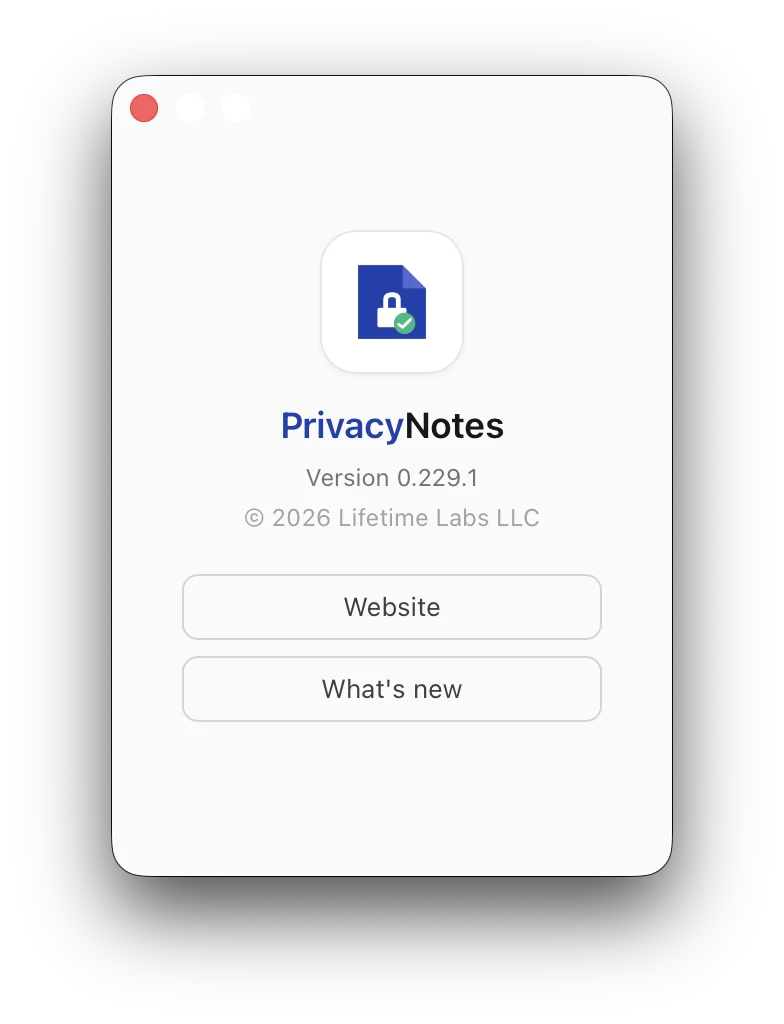
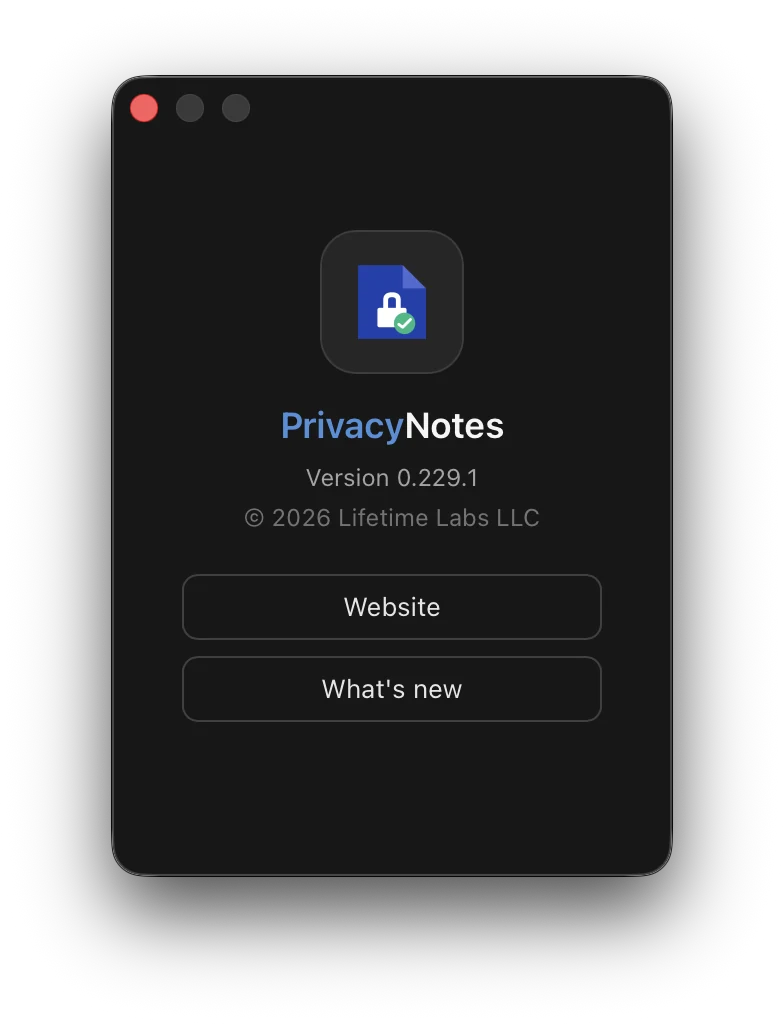
In Tauri this is a menu swap plus a tiny window. Replace the predefined About item and open a fixed-size panel:
// setup(), macOS only
use tauri::menu::{Menu, MenuItem, MenuItemKind};
let menu = Menu::default(app.handle())?;
if let Some(MenuItemKind::Submenu(app_submenu)) = menu.items()?.into_iter().next() {
    app_submenu.remove_at(0)?; // the predefined About item
    let about = MenuItem::with_id(app.handle(), "about", "About PrivacyNotes", true, None::<&str>)?;
    app_submenu.insert(&about, 0)?;
}
app.set_menu(menu)?;
app.on_menu_event(|app, event| {
    if event.id().as_ref() == "about" { open_about_window(app); }
});
fn open_about_window(app: &tauri::AppHandle) {
    use tauri::{Manager, TitleBarStyle, WebviewUrl, WebviewWindowBuilder};
    if let Some(w) = app.get_webview_window("about") { let _ = w.set_focus(); return; }
    let _ = WebviewWindowBuilder::new(app, "about",
        WebviewUrl::App("index.html?about-window=1".into()))
        .title("About PrivacyNotes")
        .inner_size(280.0, 400.0)
        .resizable(false).minimizable(false).maximizable(false)
        .hidden_title(true)
        .title_bar_style(TitleBarStyle::Overlay)
        .center()
        .build();
}
The window loads your existing web bundle with a query param; your entry point branches on it and renders a small About component instead of booting the app. That keeps the theme, translations, and version string single-sourced. hidden_title plus TitleBarStyle::Overlay floats the traffic lights over your themed background, which is what makes it look native instead of like a webview in a box.
The gotchas:
- Capabilities. Tauri permissions are per window label. Add the new label to the
windowsarray of your capability file or every API call from the About window fails. Programmatic close (for Esc) needscore:window:allow-close. target="_blank"is a silent no-op in the webview. Buttons that open your website or changelog must callopenUrlfrom the opener plugin.- Close like a native panel. Esc and Cmd+W should both close it. Cmd+W comes free if you keep the default File menu (Close Window targets the focused window); Esc is a three-line key handler calling
getCurrentWindow().close(). - One version source. Render the version from the same constant your build stamps into the bundle, or the About window will confidently lie after your next release.
The command shelf
Everything from above in one place:
# flush stale icon caches (Dock, Finder, Spotlight renditions)
sudo rm -rf /Library/Caches/com.apple.iconservices.store
killall Dock Finder

# verify what icon wiring actually shipped in a built app
plutil -p YourApp.app/Contents/Info.plist | grep -i icon   # want CFBundleIconName + CFBundleIconFile
ls YourApp.app/Contents/Resources                          # want Assets.car + the .icns

# sanity-compile an Icon Composer document without building the app
mkdir -p /tmp/icontest
xcrun actool AppIcon.icon --compile /tmp/icontest --output-format human-readable-text \
  --notices --warnings --output-partial-info-plist /tmp/icontest/partial.plist \
  --app-icon AppIcon --include-all-app-icons \
  --enable-on-demand-resources NO --development-region en \
  --target-device mac --minimum-deployment-target 26.0 --platform macosx

# quick unsigned DMG to preview the installer window
tauri build --bundles dmg
None of this is hard. It is just scattered across bundler source code, Apple release notes, and dead Stack Overflow threads, and every trap above cost us an afternoon while shipping PrivacyNotes. Steal freely.